
💡 WiseUp! Vol. 92 — Fiction for personal growth, iPhone Duo support, and more
This week, we're trading self-help for fiction with a reading list from chicgirlmoment, and one creator, Eric, explains why our team came around on the idea of a social component to reading and built what we now know is called ambient co-presence into Books.
On the app side, we've added iPhone Duo support in Reader, page turns for Kindle books in Books, and more. Read on for all the details or check out our log of weekly improvements.
Before we get into the tips…
📍 Let's start with a reading recommendation
What to read instead of self-help books to improve your mindset
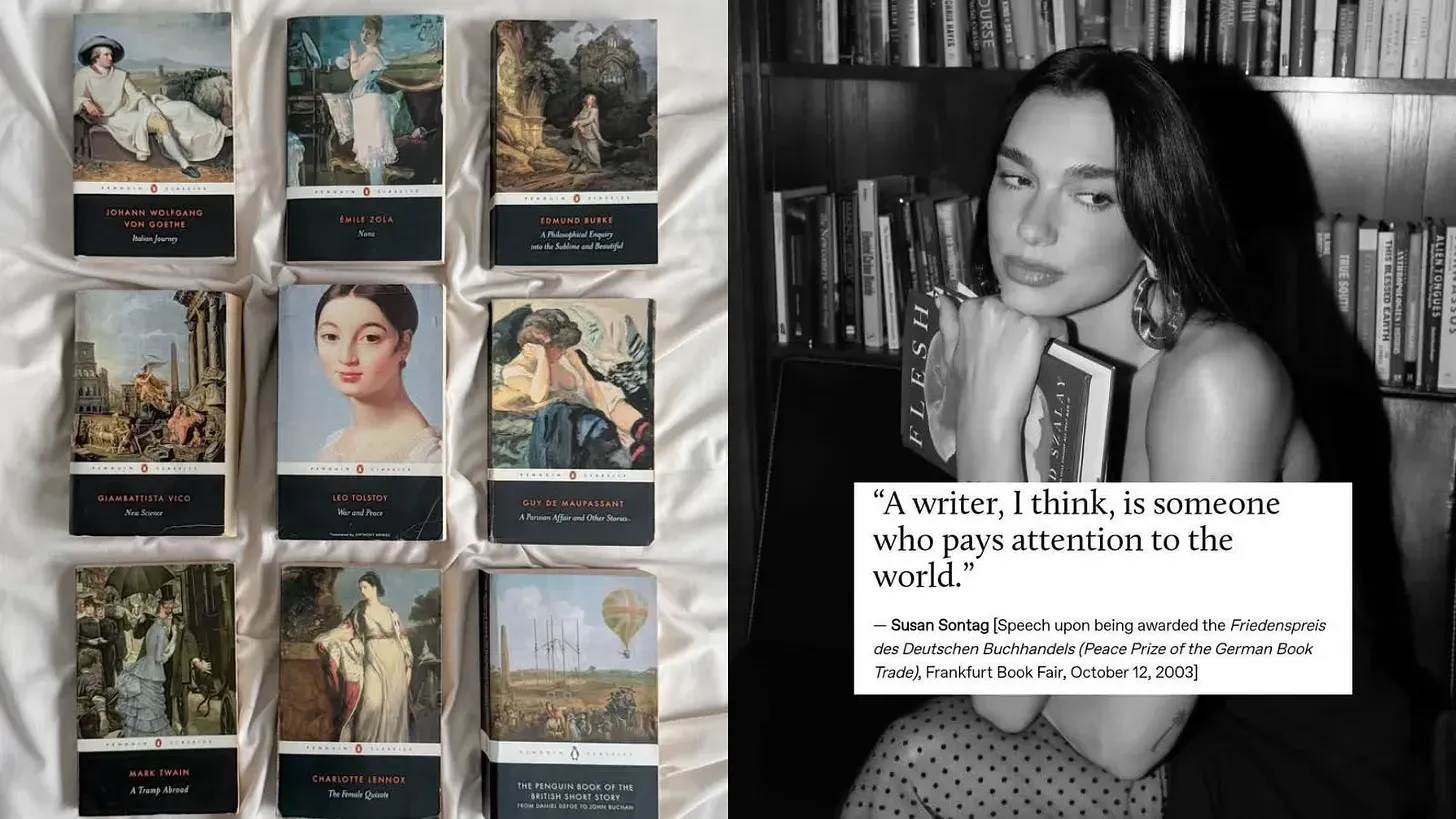
We're big fans of the self-help genre, or as we like to call it, personal growth. But sometimes fiction illustrates what's hard to put into words as practical wisdom, which is exactly what the anonymous writer behind chicgirlmoment gets at with her tight list of recommendations. "In a nutshell, the value of good fiction lies in the fact that it reveals the complexity of human nature and guides us to making our own conclusions. Through reading, we can explore ourselves and later transfer this insight to everyday life, relationships, decision-making, and the prospect of the future."
From the support inbox
Have questions about using Highlights, Reader, or Books? We'd love to be your guide! Reply to this email with your question and you might be featured in an upcoming issue. Even if your question isn’t featured, we’ll respond to every message.
❓ A Highlights question from Marian L:
Has the audio experience for Daily Reviews changed recently?
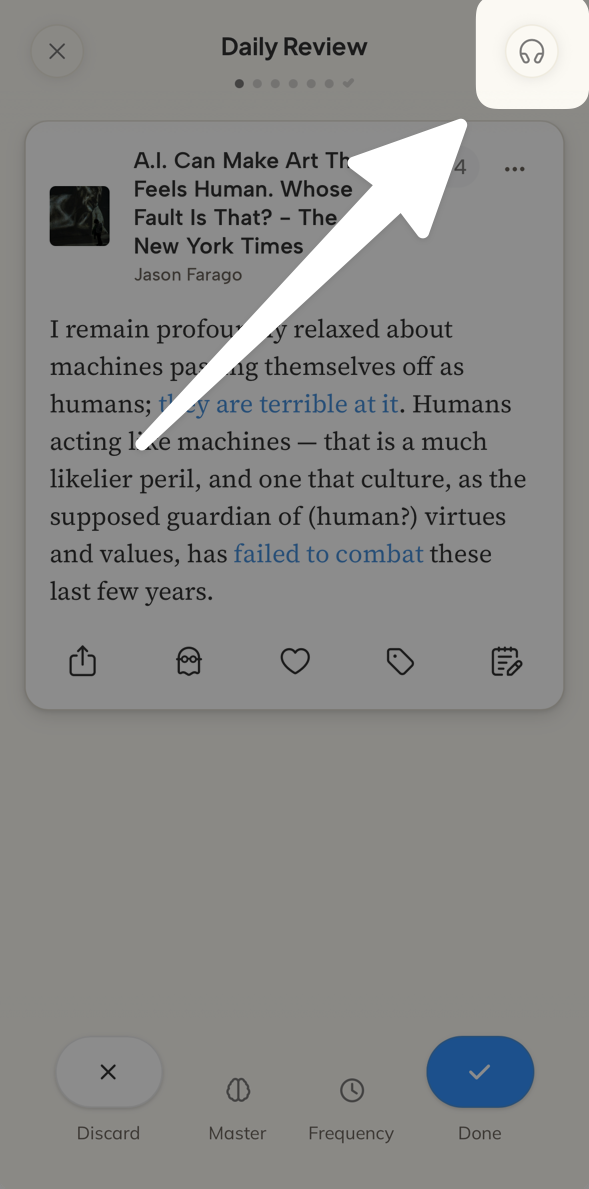
Your highlights sound better than ever! We’ve upgraded Audio Daily Reviews with more natural-sounding voices and smoother playback, so you can enjoy revisiting your favorite ideas wherever you are. Open your next Daily Review, tap the headphones icon in the top right, and have a listen.
❓ A Reader question from Jacob S:
How can I save Reader documents to my iPhone’s Files app?
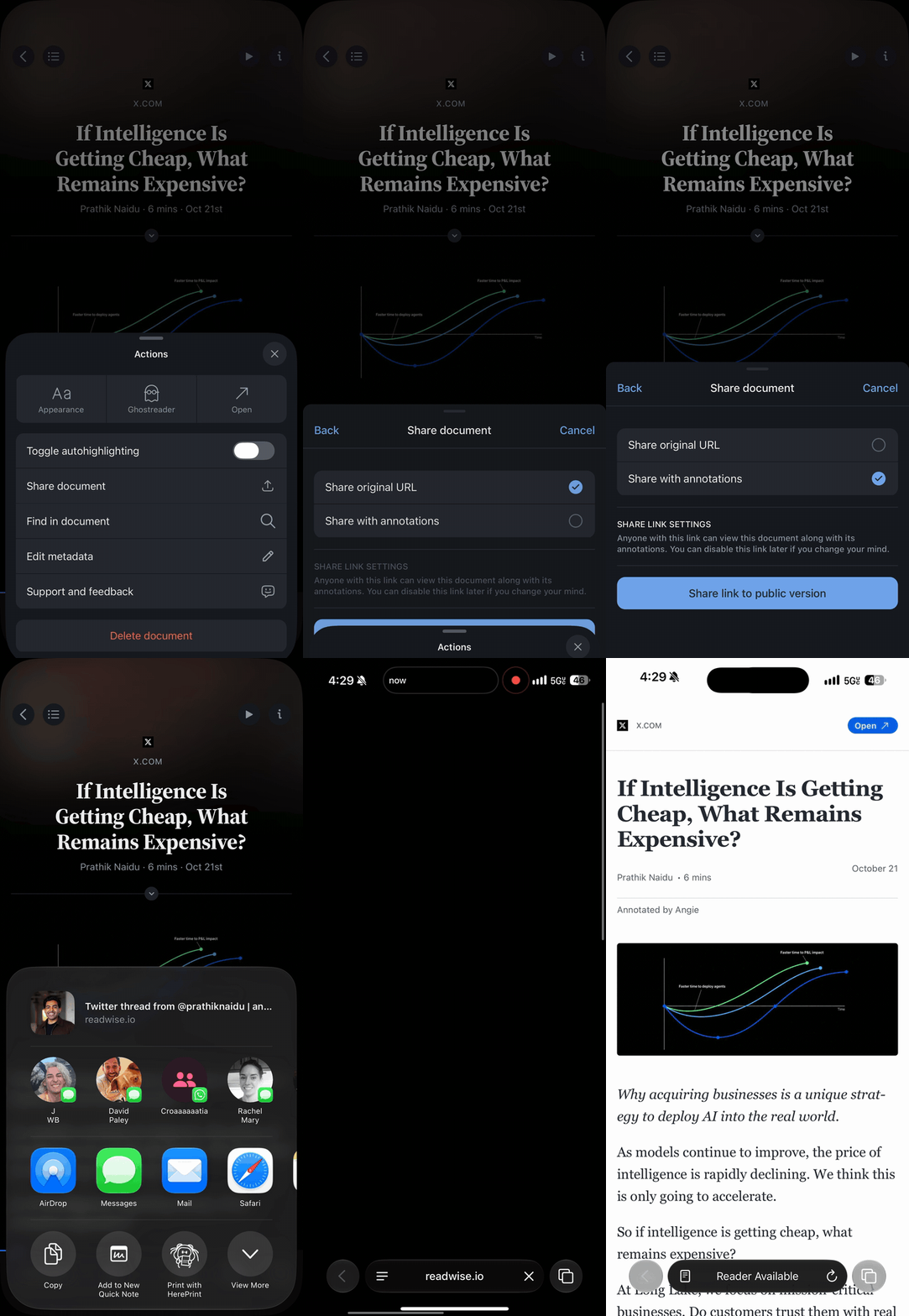
Want to keep a copy of your Reader documents, highlights, and notes in your iPhone’s Files app? Here’s how to do it! Open the document, choose Share document > Share with annotations > Share link to public version, and open the link in Safari. From there, tap Share > Print, tap the Share icon again in the print preview, and choose Save to Files. If you do this often, you can also set up an iOS Shortcut with Make PDF and Save File to save yourself a few taps.
❓ A Books question from Lee H:
Do I need an invite code to use the new Books app if I’m a Readwise subscriber?
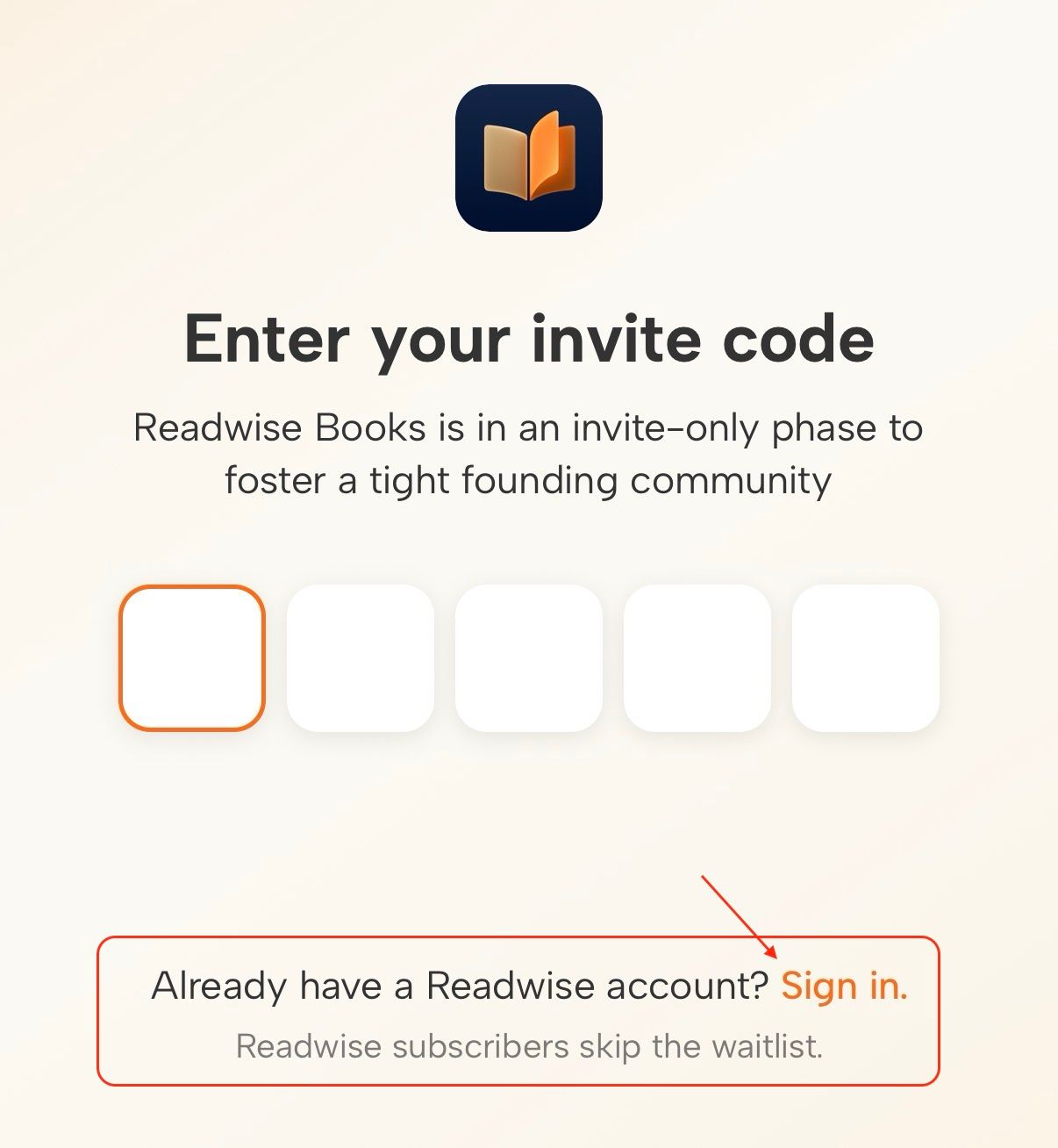
Nope, no code needed! You can tap the Sign in link underneath the code input and use your Readwise account email address to get immediate access.
📖 New help doc of the week
Where in the world is Safari's share button?
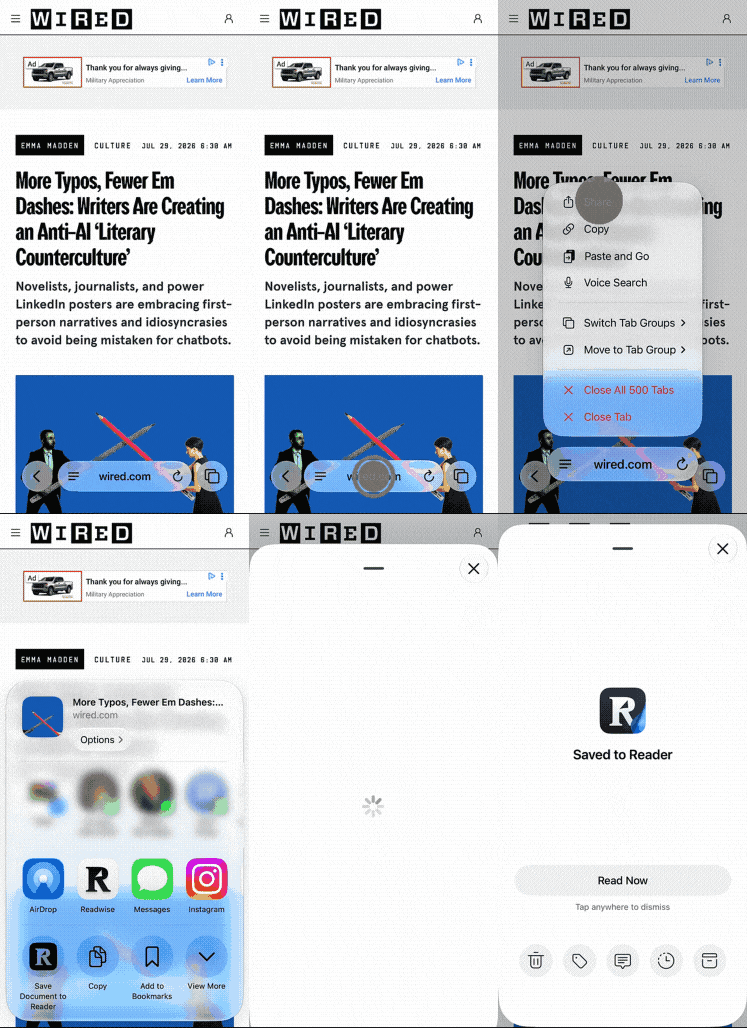
iOS 27 played a little hide-and-seek with Safari's share menu, moving it behind a long press of the URL bar. Our updated mobile saving guide shows you where it went, so your Reader library stays well fed.
🎬 New video of the week
Why We Changed Our Minds
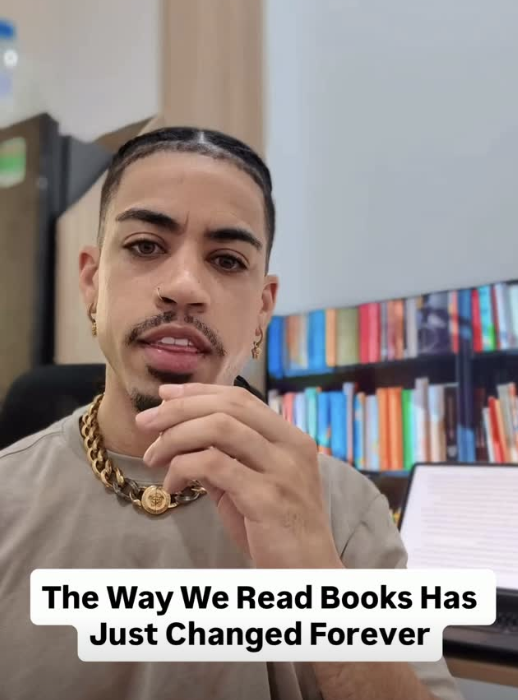
We used to believe reading was better left as a solo activity. In his latest video, Eric recaps why we changed our minds. If you want the full backstory, check out our latest founder’s blog post.
📰 Oct 23 - Oct 30 updates
What's new in Reader, Highlights, and Books
Reader
📱 NEW! iPhone Duo Support — The Reader app now fits the iPhone Duo, folded or open. Open the Duo and hold it like a book, choose Horizontal pagination in the Appearance sheet, and pages split into two columns with the gap on the fold. Reader also rotates with the hinge as you open it, and headers and lists stay clear of the Duo's clock and camera column. Thanks to Artem and Cam for the testing and fixes.
🗣️ Improved German Voices — Tobias and Sabine, the German Lifelike voices in Reader's text-to-speech, were technically English voices reading German. Artem swapped in native German speakers by the same names, so German articles and books should sound like a German speaker is reading them.
🎧 Improved Podcast Transcripts — Podcast transcripts in Reader could misspell names, drop or reword what was said, or file a sentence under the wrong timestamp so tapping a paragraph jumped the audio to the wrong spot. Tristan moved podcasts onto the same cleanup that YouTube transcripts use. The words stay as spoken, every paragraph keeps its timestamp, and transcripts should arrive faster.
💬 Improved Ghostreader Responsiveness — One slow Ghostreader answer in Reader could hold up other chats on the same server, so new conversations stalled before they started. Adam now lets the chat server work on several answers at once, so a long reply somewhere else shouldn't keep yours waiting.
📳 Fixed Shake to Undo Setting — The Reader app on iOS showed its "Do you want to undo?" dialog on every shake, even with iOS's Shake to Undo switched off. Cam made Reader respect that accessibility setting, so turning it off under Settings > Accessibility > Touch keeps the dialog away.
🔡 Fixed OpenDyslexic Accents — With the OpenDyslexic font in the Reader app, a lowercase š showed up as a capital Š, so Czech text read "dalŠí" instead of "další". Ibai repaired the font files, so š and Š each look the way they should.
📖 Fixed iPad Layouts on iPhone — Choosing Horizontal pagination for a document on your iPad carried that layout over to the Reader app on your iPhone, where the option isn't offered, and selecting and highlighting broke across pages. Adam made phones open those documents in vertical pagination, while your iPad keeps the layout you picked.
🧭 Fixed Layout Switching — Switching between scrolling and pagination in the Reader app while on a page with no body text, like a part title, sent you back to the first page of the book. Artem fixed how Reader keeps your place during the switch, so you stay where you were.
🔲 Fixed E-ink Sidebar Swipes — With E-ink mode on, swiping a sidebar open in the Reader app still played the slide animation, while the buttons opened it instantly. Adam made swipes follow the setting too, so sidebars snap open on e-ink devices.
🖼️ Fixed Cropped Notebook Images — Highlighted images in the Notebook sidebar of Reader on web could be cut off at the edge, along with their highlight outline. Adam sized them to fit the sidebar, so you see the whole image in its original shape.
🖨️ Fixed Printing with Annotations — Using the “Print with annotations” option on a long document in Reader on web could leave out highlights, starting with the first one, if you had opened the document partway down. Johannes made the printout include every highlight, wherever you are in the document.
🔌 Improved Reader API — The Reader API listed each document's reading progress but quietly ignored it when you tried to change it. You can now set reading_progress when you update or bulk update documents, and Reader's apps open the document at the new position. Thanks to Tristan, third-party Reader clients no longer need their own server to keep your place.
🛜 Parsing Updates — Krzys improved how Reader handles documents from nytimes.com, sec.gov filings, substack.com, daringfireball.net, newyorker.com, hbr.org, engadget.com, github.com, wikipedia.org, independent.co.uk, lesswrong.com, cen.acs.org, g1.globo.com, ruv.is, note.com, mp.weixin.qq.com, and Valnet sites like screenrant.com, howtogeek.com, and xda-developers.com.
Highlights
🧩 Fixed Concatenated Highlights — Highlights joined with .c1, .c2 notes in Readwise Highlights came out without a link back to their location, and their tags stayed on the hidden parts, so they never showed up on tag pages or in exports. Rasul made the joined highlight carry the first part's link and every part's tags. Existing joined highlights should pick these up the next time their book syncs.
✍️ Fixed Adding Highlights by Hand — Pasting text copied from some PDFs or ebooks into the Add Highlights page on readwise.io said "Added highlight." and then lost it, because hidden characters in the text made the save fail. Tristan now strips those characters out, so pasted highlights save.
Books
📚 NEW! Readwise Books — Meet Readwise Books, our new ebook store and reading app for iOS and Android. Think of it as a cross between Kindle and Goodreads, where you can buy, read, and track your books in one place. The store at readwise.io/books carries titles from all the major publishers, including Penguin Random House, HarperCollins, Simon & Schuster, Hachette, and Macmillan. Live reading sessions track your reading the way a fitness app tracks a workout. You can also follow other readers, import your Kindle and Goodreads libraries, highlight and take notes, and listen with text-to-speech, and everything connects to the rest of Readwise. The app is free and built to run smoothly on Android e-readers like Boox devices and Daylight. Readwise subscribers can sign in with their Readwise account today, and everyone else can join with an invite from a current reader.
🤖 NEW! Readwise Books in the MCP Server — If you use Readwise Books, the Readwise MCP server now includes 13 Books tools next to the Highlights and Reader ones. Your AI assistant can look through your books, log and edit reading sessions, and pull your reading stats without connecting a second server. Piotr added the tools, and they're listed on readwise.io/mcp.
👆 NEW! Page Turns in Kindle Books — Kindle books you open in Readwise Books can now turn pages instead of being limited to continuous scroll mode. Turn on “Page turns in Kindle books” under Settings > Reading view, or switch on “Turn pages by tapping” the first time you open a Kindle book. Tap either edge to turn the page, and tap the middle to show or hide the menus. Mati also colored the strip under the status bar to match the page, so dark-theme Kindle books don't get a light band across the top.
♻️ NEW! Recover Removed Kindle Books — If you removed a Kindle book from your Readwise Books library, refreshing Kindle wouldn't bring it back. Mati added “Recover removed books” to the “...” menu on your Kindle shelf, which lists the Kindle books you've removed. Tap Restore to put one back on your Kindle shelf.
🔑 Fixed Amazon and Apple Sign-In — If your Readwise account uses Amazon or Apple sign-in and also has a password, the Readwise Books app showed only a password field, so many long-time subscribers couldn't get in. Tristan put the Amazon and Apple buttons next to the password field, and Artem turned the easy-to-miss sign-in link on the invite screen into a proper “Sign in with Readwise” button. Existing Readwise users should now get straight in.
🔊 Improved Text-to-Speech Setup — Readwise subscribers coming to Readwise Books from Reader often couldn't find text-to-speech, because it sits behind the Assistive Reader setting, which started out switched off. Artem turned Assistive Reader on by default for Readwise subscribers, so the voices are ready when you open a book you've uploaded.
🔤 Fixed Stuck Loading Screen — Readwise subscribers whose first name has no Latin letters, such as a name written in Chinese, could get stuck on a loading screen after signing in to Readwise Books, because the app couldn't create their Books username. Tristan fixed the username step, so these accounts open normally.
🔀 Fixed Kindle and Goodreads Imports — Importing or refreshing your Kindle library in Readwise Books could spin and then fail every time, and tapping the progress pill during a Goodreads import cancelled it partway through. Mati now sends a stuck Kindle import back through Amazon sign-in and keeps the Goodreads import running while you check on it. He also fixed the Kindle reader's back arrow, which could be invisible in light mode. Both imports should run to the end now.
💳 Fixed Double Charges — If a slow connection made you tap the pay button twice in the Readwise Books store, your card could be charged twice for the same book. Tadek fixed checkout so each cart is charged once, however many times you press the button.
📤 Improved Bulk EPUB Uploads — Uploading a big batch of EPUBs to Readwise Books on the web failed for Apple Books titles stored as folders, and every uploaded book landed on your Currently Reading shelf. Tristan made the upload page pack those folders up the way Reader does, and Mati sends the rest of a large batch to Want to Read after the first two books so the books you’re actually Currently Reading don’t get buried.
🔎 Fixed ISBN-10 Search — Searching Readwise Books for a 10-digit ISBN that wasn't already in the catalog came back empty. Piotr made those searches look the book up the same way 13-digit ISBNs already do, so the book can be found and added.
⚡ Improved Profile Loading — Tapping someone’s avatar in the Readwise Books app—whether in the feed, a follower list, search, or notifications—opened their profile as a placeholder that filled in about a second later. Artem made the app reuse what it already knows about that person. Follower and following counts can take a moment, but their name, photo, and bio should now appear the moment you tap.
📰 Improved Feed Descriptions — Long book descriptions in the Home feed of the Readwise Books app were cut off with "...", with nothing to show that you could tap to read the rest. Mati added a More link to the end of the cut-off text and a Less link to fold it back up, matching a book's own page, so it's clear how to read the full description.
🔓 Fixed Goodreads Sign-In on Tablets — Connecting your Goodreads account in the Readwise Books app on an Android tablet or an unfolded foldable could stall on "Connecting to Goodreads…", because Goodreads showed those larger screens its desktop sign-in page. Johannes made the app ask for Goodreads' mobile sign-in page on every Android device, so connecting Goodreads should work on any screen size.
⭐ Fixed Goodreads Quarter Stars — Goodreads now lets you rate books in quarter stars, but importing your Goodreads library into Readwise Books rounded a 3.75-star rating down to 3. Mati made the import keep quarter stars, which Readwise Books ratings already support. If one of your ratings came in rounded, run the Goodreads import again and it should come through the way you rated it.
📥 Fixed EPUB Upload Freezes — Selecting dozens of EPUBs at once on the Upload EPUB screen in the Readwise Books app on Android could freeze the app until Android closed it. Artem made that screen pick one EPUB at a time. For a big batch, the "Bulk upload from your computer" card on the same screen points you to readwise.io/books/upload, which handles many books at once.
🔇 Fixed Loud Shutter Sound — Taking a photo of your page to log a reading session in the Readwise Books app on Android played a loud shutter sound, even with your volume turned all the way down. Mati turned that sound off on Android, so taking the photo is quiet now and a quick white flash still confirms the shot.
👍 Three recommendations from our team
From support specialist Romi
Something to read 📖
Looking for a rom-com to get distracted during these turbulent times? Romi’s got you: This Book Made Me Think Of You. She wouldn’t have chosen this book by its cover, but she’s having such a nice time reading it before bed. It’s cozy, slightly clichéd but well-written, and only a little bit cheesy.
Something to focus 🌿
Spring has just started in Argentina and Romi has made gardening her new personality. After spending a few days in London, she decided she wants an English cottage-style garden. This website is a great resource if you also want to get inspired!
Something to unwind 🪩
Are you a fan of vintage soul and R&B? Do you enjoy music that makes you feel relaxed and chill? Give Jungle a try. They just released a Tiny Desk that is absolutely perfect. And if you happen to like it, you can also check out their dance music videos. Their talent is incredible!
💬 From the Readwise group chat
Not ALL fun and games
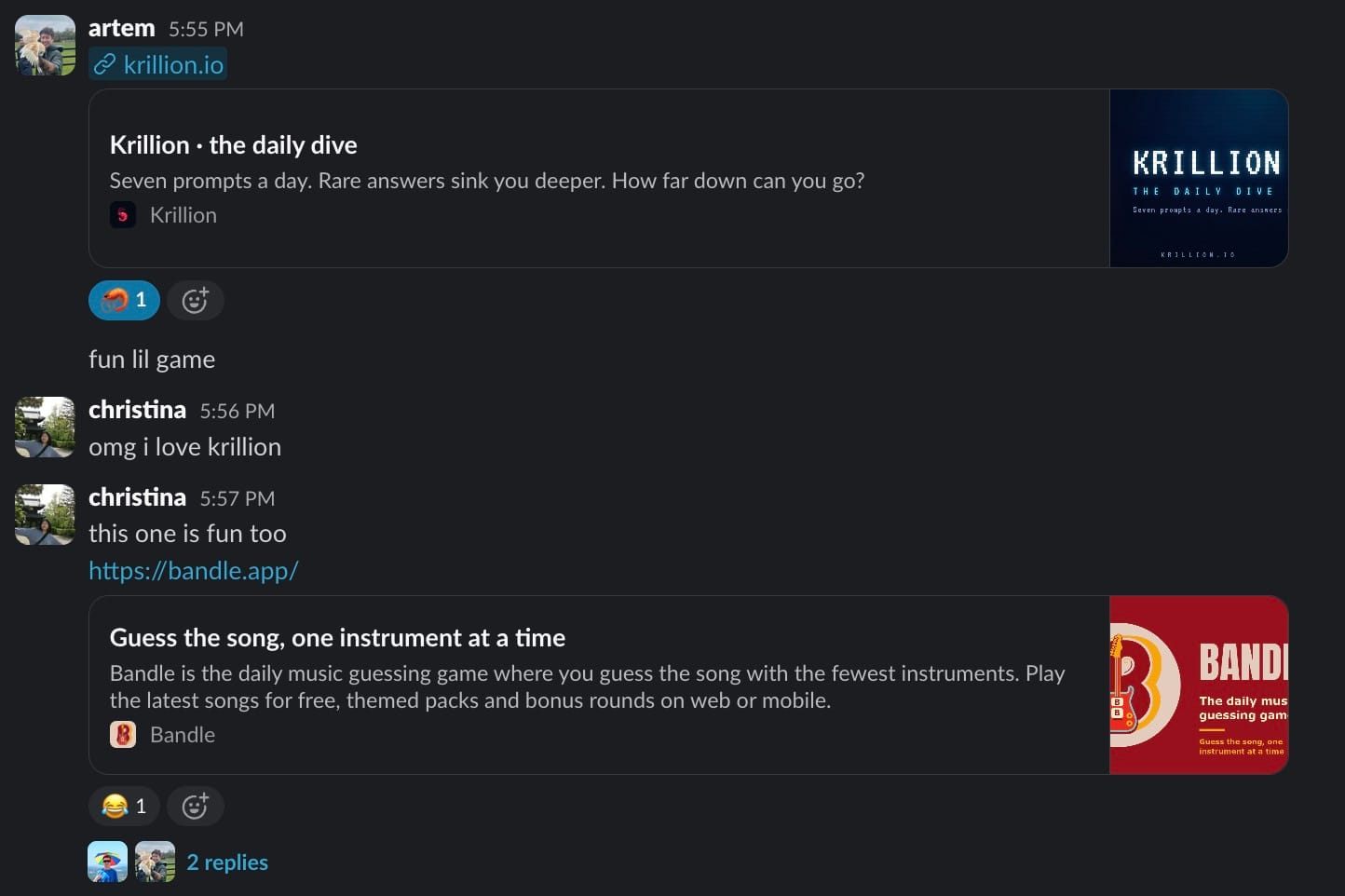
Our team can’t resist a good daily puzzle. Artem shared Krillion, where seven prompts a day pull you deeper the rarer your answers get, and Christina countered with Bandle, the music guessing game that reveals a song one instrument at a time. Consider your lunch breaks officially booked. We said we’d get back to work, but first, one more round!
Warmly,
the Readwise customer support team