
💡 WiseUp! Vol. 58 — Test your English and save your bookmarks and lists from Twitter
This week, we're doing things a bit differently: we have a side quest for you! A reading challenge that doubles as time travel. We're also showing you how to easily save content while you browse online and how to save bookmarked tweets and Twitter lists in Reader.
On the app side, we've fixed highlight navigation and resizing, improving the way you read and remember your content. Read on for all the details or check out our log of weekly improvements.
Before we get into the tips…
📍 Let's start with a reading recommendation
How far back in time can you understand English?
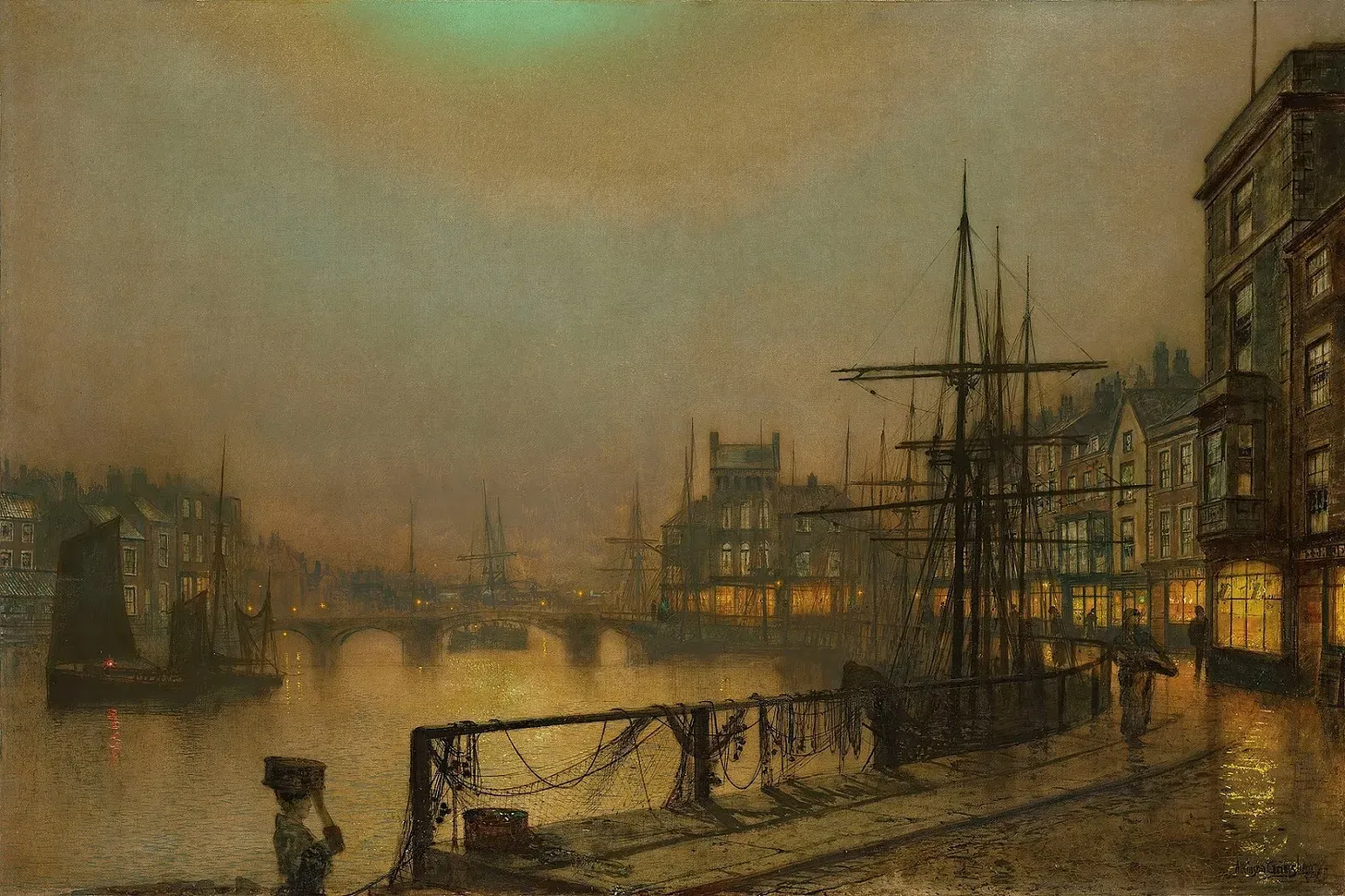
If you enjoy games and think you could ask for directions in 1025, PhD linguist Colin Gorrie is here to humble you. He's written a single story that travels backward through 1,000 years of the language: same plot, aging grammar and vocabulary. Your challenge is to read until you can't understand anymore, then see what linguistic shift made you give up. “Go back far enough, and English writing becomes unrecognisable. Go forward far enough and the same thing will happen, though none of us will be around to notice.”
From the support inbox
Have questions about using Readwise or Reader in your workflow? We'd love to be your guide! Reply to this email with your question and you might be featured in an upcoming issue. Even if your question isn’t featured, we’ll respond to every message.
❓ A Readwise question from Stephen N:
Can I get my bookmarked tweets in Readwise to save in Reader as well?
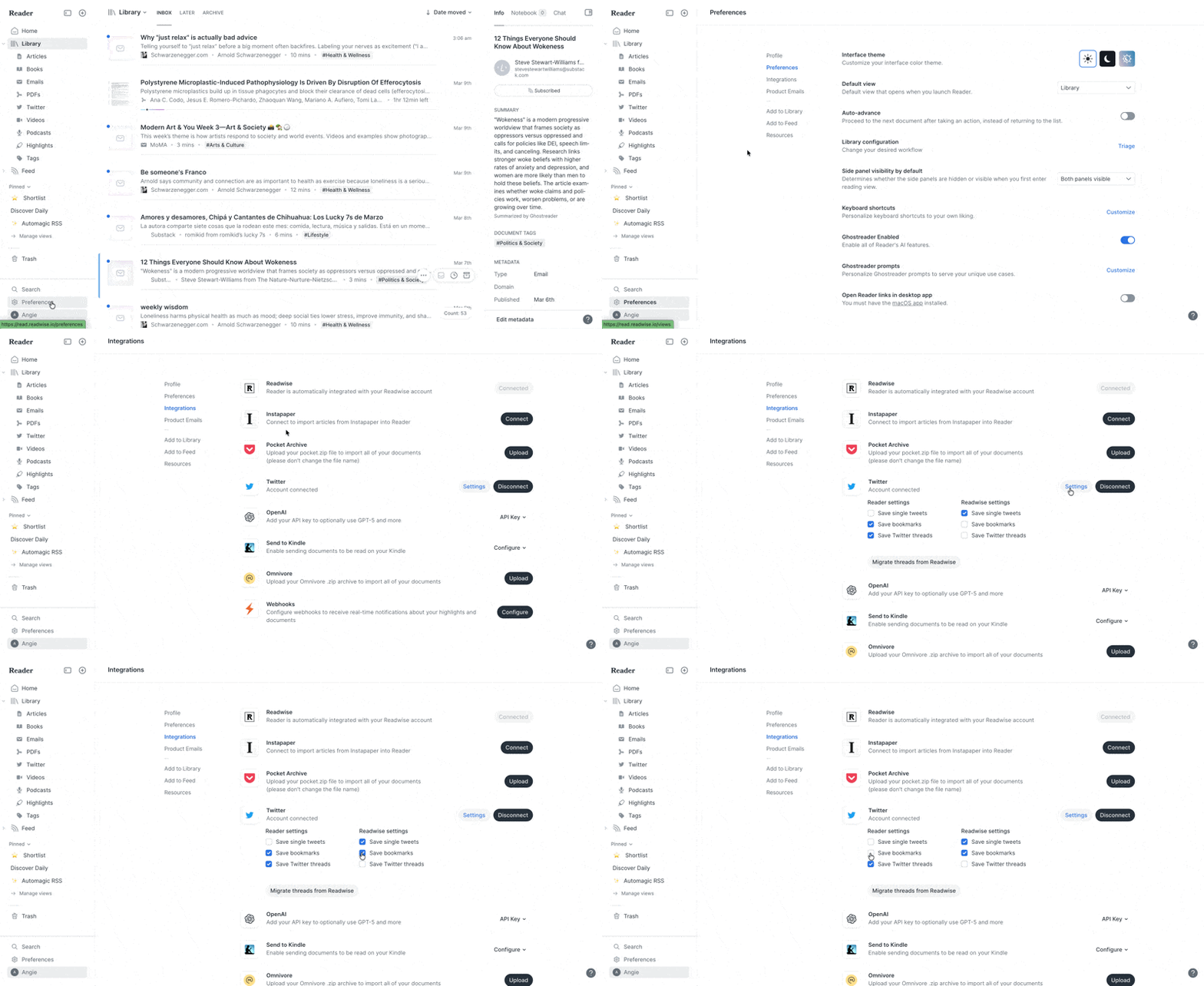
This used to be limited to Readwise, but now you can choose separate settings for saving Twitter bookmarks in Readwise and Reader. That means you can decide exactly where those bookmarks should go. If you prefer to keep them in one place or split them between the two, you have that control. You can update these settings from the Integrations page in Reader by selecting Settings next to Twitter.
❓ A Reader question from Trevor Y:
How do I see how many documents I have in a folder?
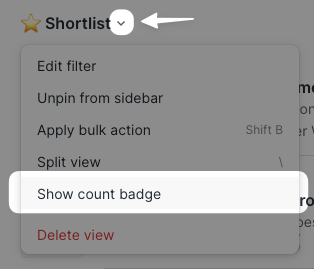
See at a glance how many items are waiting in any saved Filtered View. The count badge appears on the icon in the left sidebar, giving you a quick snapshot of how many documents are waiting to be reviewed. To switch it on, just click the down arrow next to the view’s name at the top and toggle the count badge.
📖 New help doc of the week
Turn any link into a “Save to Reader” shortcut
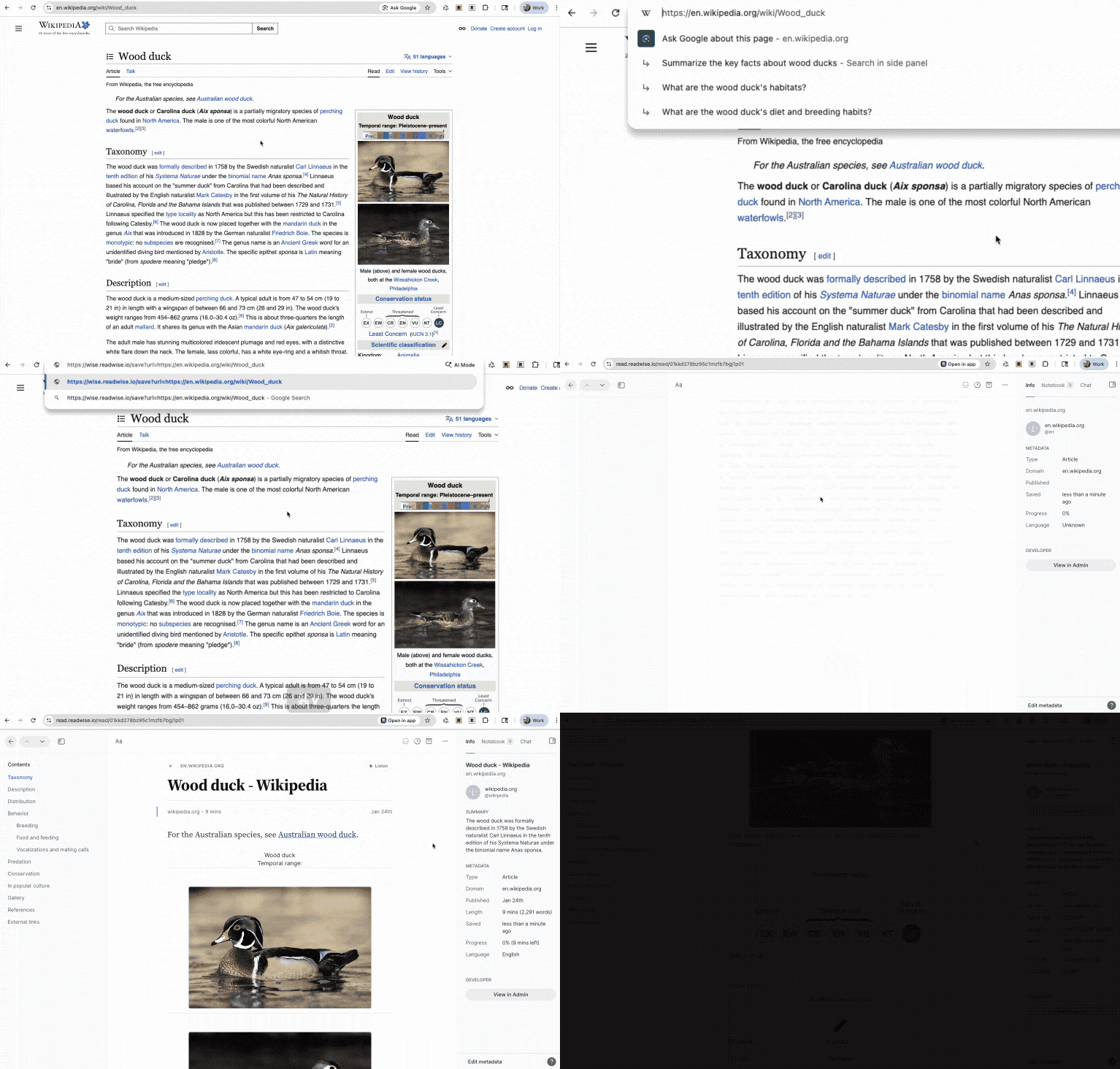
Saving articles to Reader doesn’t always require a browser extension or share sheet. Cayla’s new guide shows how a simple URL format can send any article straight to your Reader inbox, which is great for automations, quicklinks, or clever productivity hacks. (It’s the same method we use for the save links in this very newsletter!)
🎬 New video of the week
Bypass the algorithm

Twitter lists are one of the most underrated features in Twitter, allowing you to stay connected to your favorite accounts and bypass everything else. Plus, you can automatically import those tweets into your Reader account in a twice-daily digest.
📰 Feb 28 - Mar 6 updates
What's new in Reader and Readwise
🔖 Fixed Highlight Navigation — Tristan and Adam fixed a bug where tapping a highlight in the Notebook sidebar on mobile didn't scroll to that highlight in the document.
↔️ Fixed Highlight Resizing — Adam fixed a bug where highlights spanning multiple text elements (like bulleted lists) could lose their yellow background after resizing with the adjustment handles. This should also fix some cases where highlights appeared to vanish when switching documents or pages.
🎧 Fixed Podcast Transcriptions — Mati fixed an issue where some podcast platforms were failing to transcribe some episodes.
📖 Improved Reading Progress — Artem and Lior enhanced the reading progress modal for EPUBs to show more detail at a glance. You can now choose between percent, page number, time left in chapter, time left in book, or hidden and each option previews the current value right in the picker.
🔍 Fixed Exact Domain Filters — Arek fixed a bug where using __exact with domain filters in filtered views returned no results. If you had a view filtering for exactly github.com but not subdomains like docs.github.com, it should now work as expected.
📓 Fixed Notebook Duplicates — Adam fixed a bug where certain highlights on mobile could show duplicated text in the Notebook panel. This happened when a highlight contained an image and spanned nested HTML elements — the text would render twice on iOS and Android even though it displayed correctly on web.
🏷️ Fixed Tag Trimming — Adam improved server-side trimming for tag names, so tags created via the API or share extension can no longer end up with trailing spaces that cause issues.
☯️ Fixed Split View Shortcut — Mati fixed the \ keyboard shortcut for toggling split view. It should now properly fire on filtered views.
🐦 Fixed Twitter Imports — Ibai fixed an issue with the Twitter integration, so now chats should come in properly again.
📋 Fixed Title Updates — Arek fixed a bug where editing a document's title through the metadata sheet on Android didn't update the title shown in the Library or the bottom sheet until you force-refreshed. Titles now update immediately.
👆 Fixed Tap Targets — Arek fixed a bug on Android where the + and ... buttons in the Library header had overlapping tap targets, so tapping near the boundary of one could trigger the other.
🦊 Fixed Firefox Kindle Sync — Ibai fixed a bug that was causing Firefox users to get an outdated version of the Kindle sync extension. Kindle sync should now work again for Firefox users.
📊 Fixed OneNote Export — Tristan fixed an issue where tags containing special characters like &, <, or > could break OneNote exports or produce corrupted rendering.
📸 Fixed Android Quoteshot Sharing — Mitch fixed a bug on Android where the quote share dropdown was hidden behind the card, so it's now possible to control how you share beautiful highlight images again.
🤖 Updated Ghostreader Models — If you bring your own OpenAI API key for Ghostreader prompts, you can now select GPT-5.2 as a model option.
🔀 Fixed Obsidian Export Crashes — Piotr fixed a memory issue that could cause Obsidian exports to crash for users with large libraries. Exports now process documents in efficient batches, so even the biggest collections should export smoothly.
🛜 Parsing Updates — Krzys improved how Reader handles documents from technologyreview.com, nvidia.com, extremetech.com, illwill.com, and animalcrossingworld.com.
👍 Three featured finds from the CX team
From technical writer Cayla
Something to read 📖
Everyone has that one book or series they’re a little too eager about recommending. For Cayla, it’s V.E. Schwab’s Shades of Magic trilogy. A Darker Shade of Magic is a rare fantasy where the worldbuilding and the character work amplify each other instead of competing for space, and where the people are complicated enough that you're never fully sure who to root for. If you've ever bounced off the genre for feeling too sprawling or too thin on humanity, this is one to try.
Something to focus 💅
When she wants to feel locked in on life, Cayla gives herself a low maintenance, at-home manicure with her favorite Mooncat nail polishes: Midnight Rider, a deep blue with a subtle sparkle, and Outlaw Country, a perfectly elegant silver.
Something to unwind 🚗
Traffic jams in real life aren’t often very relaxing, but Cayla loves to unwind with a few rounds of Mini Motorways, a deceptively simple road-building game that’s easy to learn but hard to master. (It’s even available through Apple Arcade, if you want to play on the go!)
💬 From the Readwise group chat
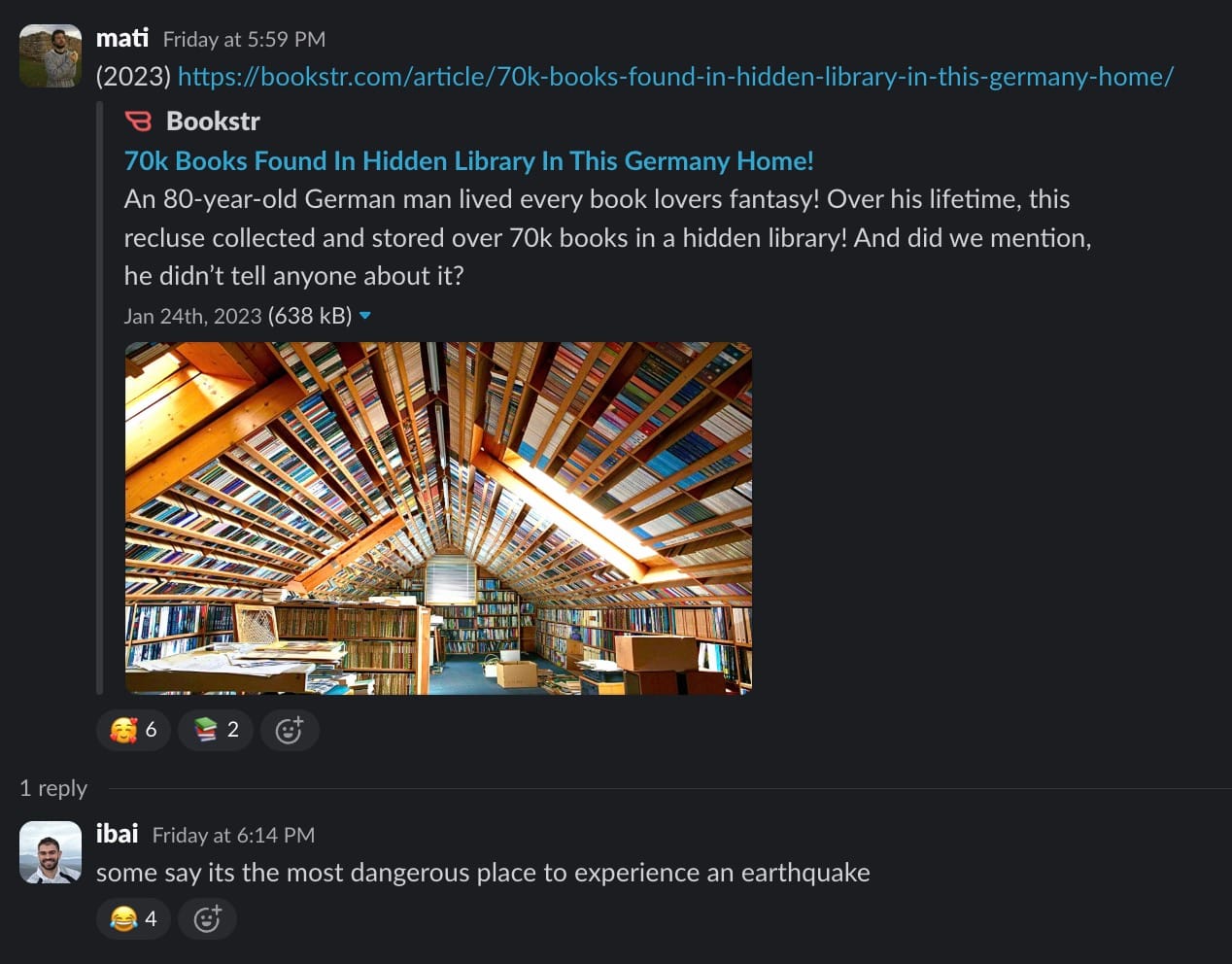
Discover a hidden library
You might know this about us by now: we love to share beautiful libraries, to think of taming 3000 books or more, and to explore new destinations in the world. We just hope we don't happen to be under this magnificent dome of books if the Earth decides to shake!
Warmly,
the Readwise customer support team